> For the complete documentation index, see [llms.txt](https://docs.scoreholio.com/llms.txt). Markdown versions of documentation pages are available by appending `.md` to page URLs; this page is available as [Markdown](https://docs.scoreholio.com/player-help/player-help/spr+.md).

# SPR+

Remove ads, explore tournament stats, compare players, and get more from every game with SPR+.

## More stats. More insight. No ads.

You already play the games. **SPR+ helps you get more out of them:** explore your tournament performance, revisit your history, compare yourself with other players, and make Scoreholio your own—all without ads.

**Ready to upgrade?** Open the **top-right menu → Upgrade to SPR+** at the top of the Options menu. [See the steps below](#how-to-upgrade-to-spr+).

[Explore the benefits](#what-you-get-with-spr+) · [How to upgrade](#how-to-upgrade-to-spr+)

## What you get with SPR+ <a href="#what-you-get-with-spr" id="what-you-get-with-spr"></a>

### Lose the ads

**SPR+ removes ads.** Spend your time finding your next tournament, checking your results, and following your games.

### See how you played in a tournament

The final score is only part of the story. **SPR+ unlocks in-tournament player stats** so you can explore your performance inside the tournament dashboard.

Open a tournament and tap **Dashboard**. Start with the [Tournament Dashboard guide](https://docs.scoreholio.com/player-help/player-help/tournament-dashboard.md).

Stats depend on the sport and the scoring data recorded for the event. ScoreMagic detail is available for supported sports when ScoreMagic was used.

### Settle the rivalry

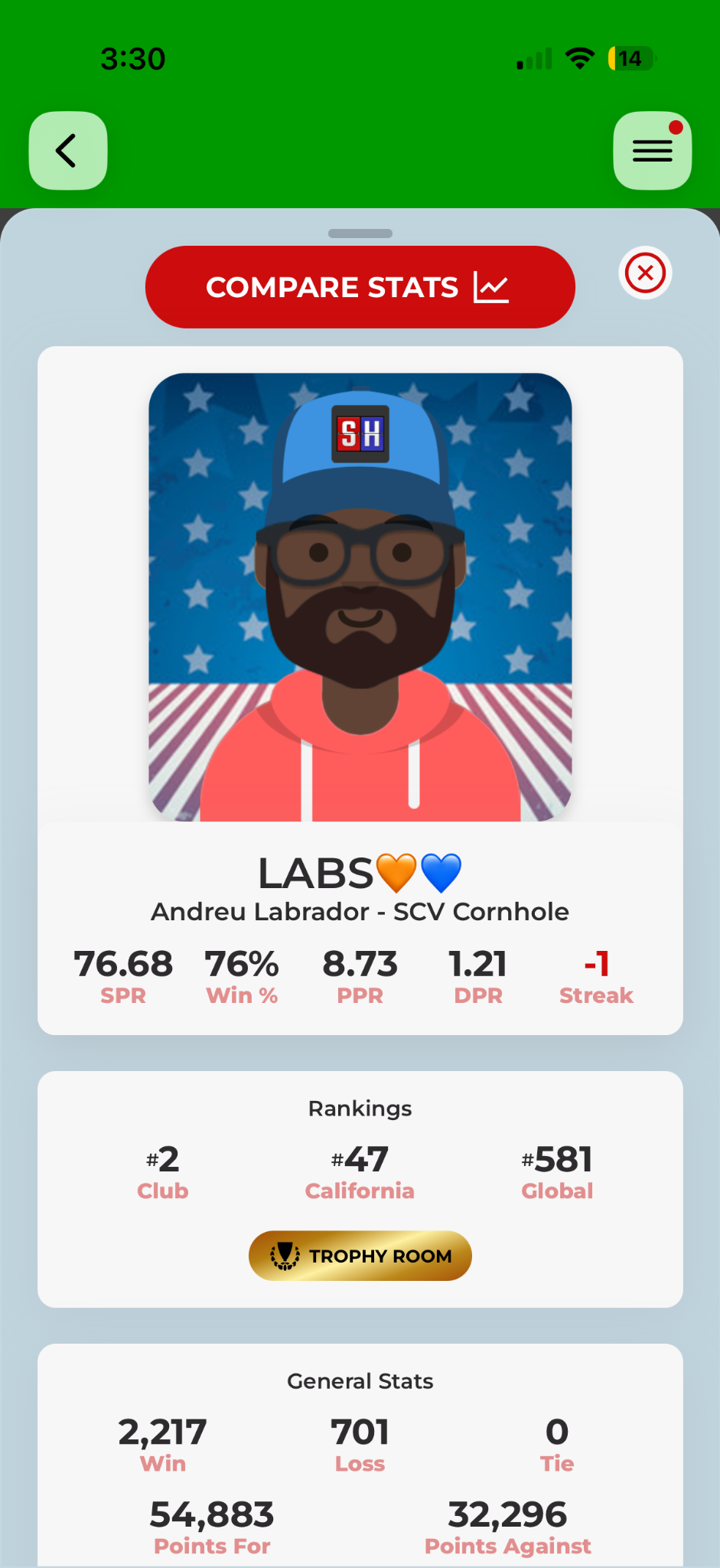
Think you always lose to the same person? Look them up and check. Explore another player's stats, compare players or teams, and see how different partner combinations stack up.

{% tabs %}
{% tab title="Compare players" %}

<figure><img src="https://2830358067-files.gitbook.io/~/files/v0/b/gitbook-x-prod.appspot.com/o/spaces%2F-MNzFwCQPtCEArD8DRaL%2Fuploads%2Fgit-blob-84e20724088495b6a348193725e27cd4dd62d237%2Fplayer-compare-head-to-head.png?alt=media" alt="Player comparison report" width="420"><figcaption><p>Compare performance and head-to-head results.</p></figcaption></figure>

\[Compare Players and Teams]\(compare-players-and-teams.md)
{% endtab %}

{% tab title="Explore a player" %}

<figure><img src="https://2830358067-files.gitbook.io/~/files/v0/b/gitbook-x-prod.appspot.com/o/spaces%2F-MNzFwCQPtCEArD8DRaL%2Fuploads%2Fgit-blob-25b80f5187661e96ab5239a63e235640269bb611%2Fplayer-rankings-player-profile.png?alt=media" alt="Another player&#x27;s profile with Compare Stats" width="420"><figcaption><p>Open a player from Rankings to explore their stats and use Compare Stats.</p></figcaption></figure>

\[Explore Rankings]\(global-and-club-rankings.md)
{% endtab %}
{% endtabs %}

### Find the game you are thinking of

Access and search your full game history, revisit results, and explore other players' histories. Open an individual match for its available details instead of relying on memory.

[Explore Play History](https://docs.scoreholio.com/player-help/player-help/player-profile/play-history.md)

<figure><img src="https://2830358067-files.gitbook.io/~/files/v0/b/gitbook-x-prod.appspot.com/o/spaces%2F-MNzFwCQPtCEArD8DRaL%2Fuploads%2Fgit-blob-a4ebc84bc8488861f504db0e423d67c25c060312%2Fplayer-match-stats-info.png?alt=media" alt="Match details opened from Play History" width="420"><figcaption><p>Revisit a game's score, opponent, date, and recorded details.</p></figcaption></figure>

### Make the home screen yours

Choose the layout and widgets that work for you. Move, resize, add, or remove home-screen items and save your setup.

<figure><img src="https://2830358067-files.gitbook.io/~/files/v0/b/gitbook-x-prod.appspot.com/o/spaces%2F-MNzFwCQPtCEArD8DRaL%2Fuploads%2Fgit-blob-9fe050358ded71e202c802f18ae42ee4c395743d%2Fhome-customize-controls-light.jpg?alt=media" alt="Home screen customization controls" width="420"><figcaption><p>Arrange your home screen around how you use Scoreholio.</p></figcaption></figure>

[Customize Your Home Screen](https://docs.scoreholio.com/player-help/player-help/customize-your-home-screen.md) · [Explore Homepage Widgets](https://docs.scoreholio.com/player-help/player-help/customize-your-home-screen/homepage-widgets.md)

### Learn from your bags and tags

For cornhole, see how you perform with different bags and under the conditions you tag. Compare the numbers behind your choices, then expand a bag or tag to revisit the games behind them.

<figure><img src="https://2830358067-files.gitbook.io/~/files/v0/b/gitbook-x-prod.appspot.com/o/spaces%2F-MNzFwCQPtCEArD8DRaL%2Fuploads%2Fgit-blob-1fb8233b6a74befbad343d22f1429be9e9edc5f7%2Fplayer-bag-tag-stats.png?alt=media" alt="Cornhole Bag Stats and Tag Stats" width="420"><figcaption><p>Explore matches, rounds, PPR, opponent PPR, and differential by bag or tag.</p></figcaption></figure>

[Use Bag & Tag](https://docs.scoreholio.com/player-help/player-help/player-profile/bag-tag-breakdown.md)

### Request a correction

An incorrect game in your profile? Use the Correction Center to request a correction. Requests have an **8-day deadline** and a review process.

[Request a correction](https://docs.scoreholio.com/player-help/player-help/spr+-1.md#requesting-a-correction)

### One player upgrade, across Scoreholio sports

SPR+ includes all sports on Scoreholio. The stats available vary by sport: cornhole has its bag and round detail; pickleball charts show DUPR Doubles and Singles; other sports have their applicable stats.

Your subscription also supports continued Scoreholio development.

## How to upgrade to SPR+ <a href="#how-to-upgrade-to-spr" id="how-to-upgrade-to-spr"></a>

Sign in to your [player account](https://docs.scoreholio.com/player-help/player-help/account-setup.md), then follow these two steps.

### 1. Open the menu and tap Upgrade to SPR+

From the Home screen, tap the **menu in the top-right corner**. Tap the gold **Upgrade to SPR+** button at the very top of the Options menu.

<figure><img src="https://2830358067-files.gitbook.io/~/files/v0/b/gitbook-x-prod.appspot.com/o/spaces%2F-MNzFwCQPtCEArD8DRaL%2Fuploads%2Fgit-blob-0d17e20e946d0ddbfff138ec29856911617a5b5f%2Fspr-plus-upgrade-menu.png?alt=media" alt="Options menu with the gold Upgrade to SPR+ button at the top" width="420"><figcaption><p>Open the top-right menu, then tap Upgrade to SPR+.</p></figcaption></figure>

### 2. Choose your plan and get SPR+

On the subscription screen, make sure **Player** and **SPR+** are selected. Choose **Monthly** or **Annual**, review the price and billing period shown, then tap the gold **Get SPR+** button and follow the purchase confirmation prompts.

<figure><img src="https://2830358067-files.gitbook.io/~/files/v0/b/gitbook-x-prod.appspot.com/o/spaces%2F-MNzFwCQPtCEArD8DRaL%2Fuploads%2Fgit-blob-f9a32eb16a1fedaa1a51a6f2cd92deb6c141b7cb%2Fspr-plus-plan-selection.png?alt=media" alt="Player SPR+ subscription screen with Monthly and Annual options and the gold Get SPR+ button" width="420"><figcaption><p>Choose Monthly or Annual, then tap Get SPR+ to continue.</p></figcaption></figure>

{% hint style="info" %}
**Already paying for an organizer plan?** Paid Scoreholio organizer plans include SPR+. Check your existing access before buying a separate player subscription. See [Subscriptions](https://docs.scoreholio.com/subscriptions-and-accounts/subscriptions-and-accounts/subscriptions.md).
{% endhint %}

You can always play on Scoreholio for free. Upgrade when you want the extra insight, personalization, and ad-free experience.

Looking for the rating rules? **SPR is your rating; SPR+ is the subscription.** Read [Scoreholio Player Rating](https://docs.scoreholio.com/player-help/player-help/spr+-1.md) for calculation, provisional players, and 0.00 changes.